AI Coding Agents
AI coding agents like Claude Code and Codex have become an essential part of research workflows. These agents read through a repository, edit files, run shell commands, write and submit Slurm scripts, and explain the error you just hit—all from the terminal. These tools are available for use on Discovery and Endeavour with a safety layer that lets researchers use them without disrupting the clusters.
Although they boost productivity, these agents do not automatically follow the protocols that keep a shared system healthy. Discovery and Endeavour are used by thousands of people on the same file systems, using the same handful of login nodes while several team members in each project share the same group storage. An agent that runs one wrong command can have far-reaching consequences beyond the user who initiated it. It can delete the wrong directory, or slow down the login node for hundreds of users with a job that belonged in a Slurm allocation. To maintain the productivity AI coding agents provide, but reduce the risks they introduce, we built a CARC harness.
1 Claude Code and Codex on the cluster
The image below illustrates how your AI coding agent requests are handled, both on the cluster and in the model provider’s cloud. The command-line tool runs on the cluster, under your account. When you give the agent a task, it proposes one step at a time, and each step runs on the node (i.e., read this file, edit that function, run this command, etc). The model itself runs in the provider’s cloud, where it decides the next step from the context the tool sends it. The result goes back, and the loop repeats until the task is done.
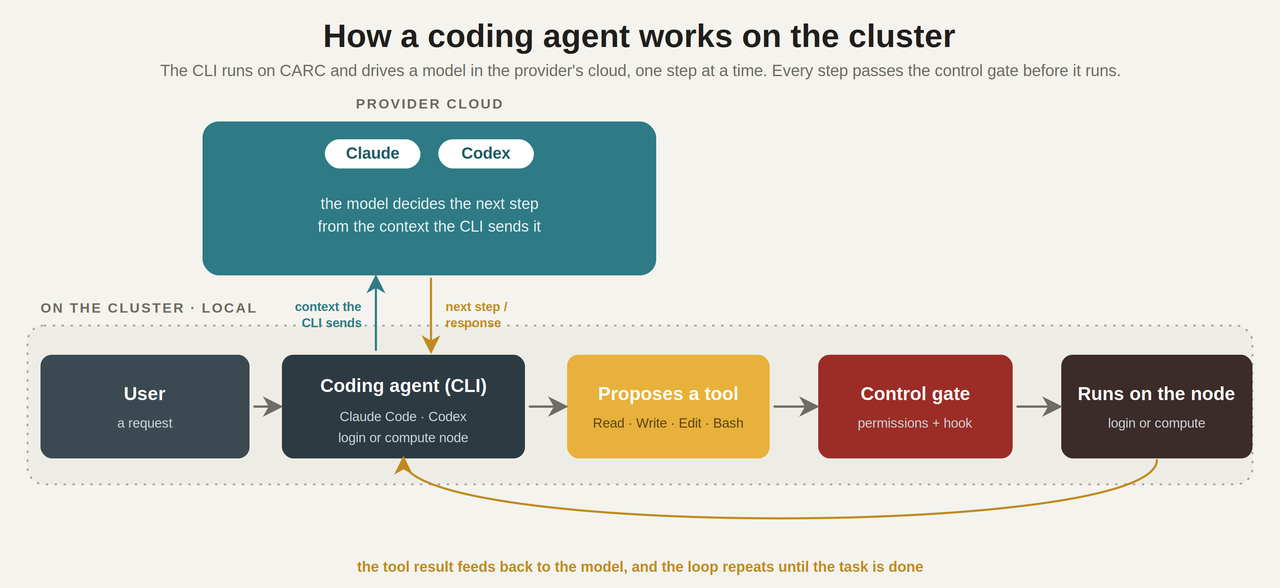
The client does not upload your whole project to the provider’s cloud, but to work on a task, it sends the model the context it needs for each step: your prompt, the relevant file contents, diffs, command output, and error messages. That contextual information leaves CARC for the provider, encrypted in transit, so sensitive or restricted data in mind. Retention and training terms depend on your provider and account.
2 The CARC harness
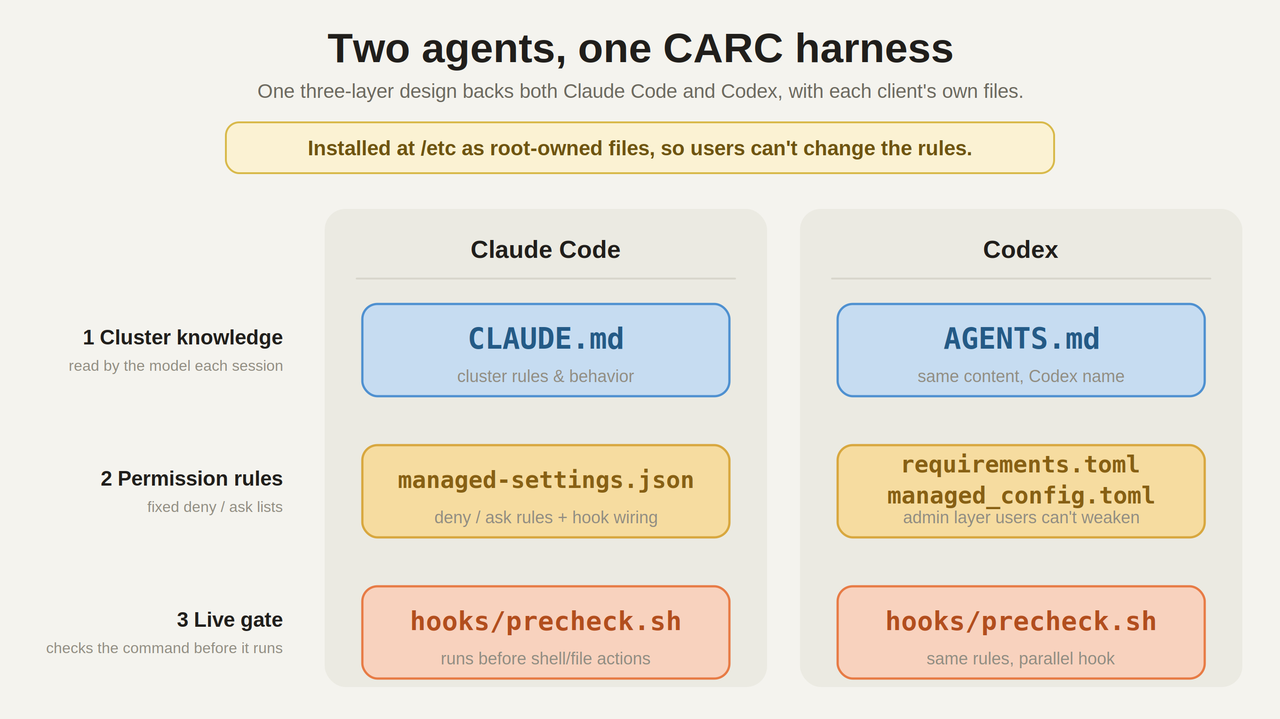
By default, these tools do whatever the model decides is necessary to complete the task it was given. The CARC harness provides a safety net in three layers: a file of cluster rules the model reads, a fixed set of permission rules, and a live check that runs before every action. The same three layers ship for both Claude Code and Codex, under different file names. These rules simply reflect good practice on a shared system, whether or not an agent is involved.
No set up or installation is required. The harness is already installed at /etc on the Discovery and Endeavour login and compute nodes. When you start Claude Code or Codex, the cluster rules, the permission settings, and the live check are already in effect for your session. Just use the tools as you normally would.
CARC recommends:
- Skimming the rules the agents follow (
CLAUDE.mdorAGENTS.md) so you know what to expect. - Keeping in mind what leaves the cluster before sending research content to a model.
- Reporting anything that blocks legitimate work, or any confusing message, to carc-support@usc.edu.
2.1 The cluster rules
Every session, the model reads a file of CARC-specific knowledge it would not get from general training; where each filesystem lives and what it is for, the storage quotas, the difference between login and compute nodes, how the module system works, how to check a Slurm account and partition before submitting, and which files and directories to stay away from. Claude Code reads this as CLAUDE.md, and Codex reads it as AGENTS.md. This layer shapes how the agent behaves, though it is guidance rather than a hard stop.
2.2 Fixed permission rules
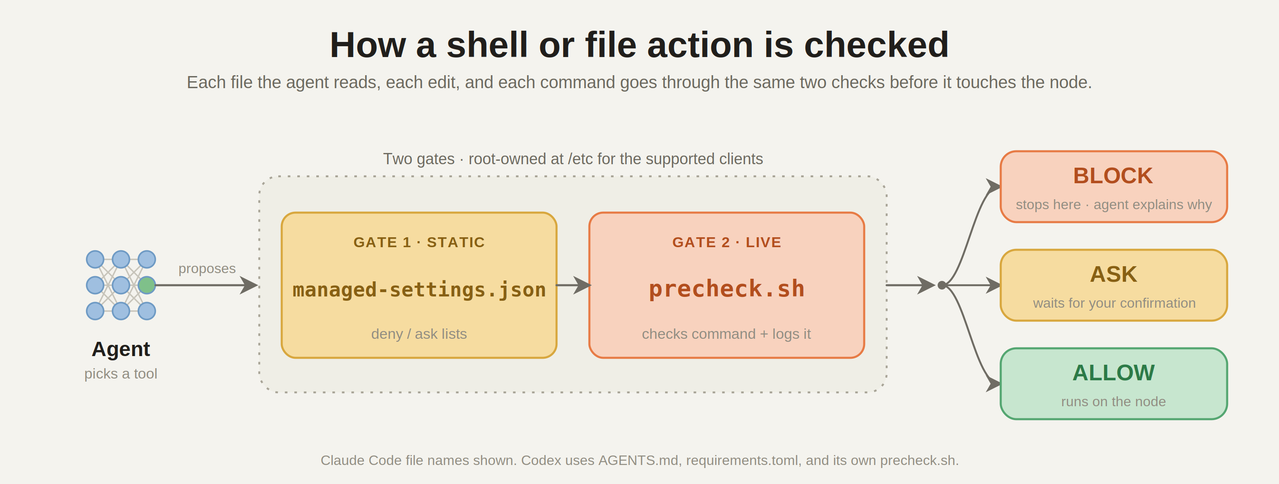
The next layer is a set of static allow, ask, and deny rules. Some actions are denied outright, such as reading your private SSH keys or writing to system files under /etc. Others are set to ask, so you get a prompt you have to answer—bypass mode is turned off. These rules live in managed-settings.json for Claude Code and in requirements.toml for Codex. Because they are installed as root-owned files, a user cannot loosen them in the supported client.
2.3 Live check on shell and file actions
The last layer is a hook, precheck.sh, that runs before the shell and file actions the agent proposes. It reads the actual command or path involved and returns one of three answers, block it, ask permission from the user, or allow it. Each answer is written to an audit log. This is where the rules that depend on context live—the ones a fixed list cannot express—like catching heavy computation aimed at a login node or a destructive command pointed at another group’s data.
2.4 Using Claude Code and Codex with the harness
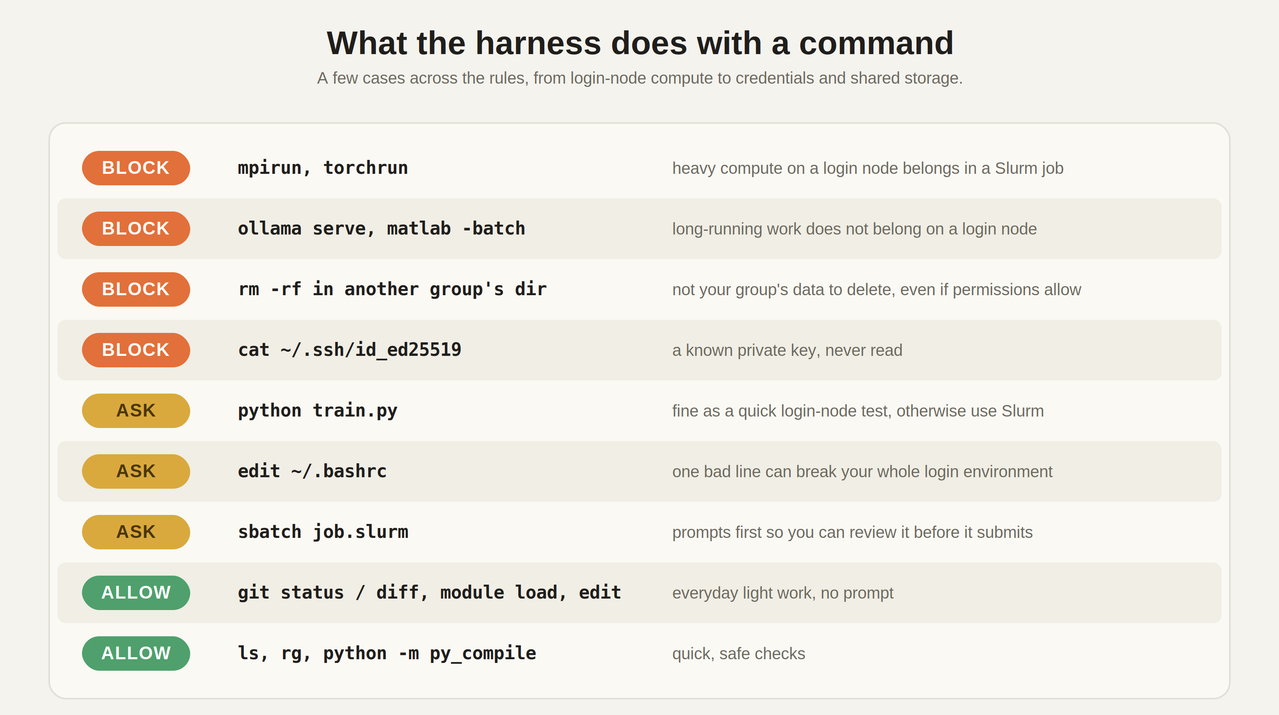
Heavy work stays off the login nodes. If the agent tries to launch mpirun, torchrun, a Jupyter server, matlab -batch, or anything else that belongs on a compute node, the hook blocks it on discovery1/2 and endeavour1/2 and tells the agent to move the work into a Slurm allocation. A plain python script.py prompts you first, so a quick test only needs a single confirmation to proceed, while editing files and routine git and module commands run without interruption. Actions that reach beyond your own work, like a git push or an sbatch, prompt first.
Shared data is protected the same way. A destructive command aimed at another group’s /project2 directory is blocked even when Unix permissions would have allowed it. Slurm scripts are shown to you before they are submitted, so you can check the account, partition, and resource request. Credential files and shell startup files stay off limits unless you approve the read yourself.
Codex starts in its workspace-write sandbox with untrusted approvals, so it asks before acting outside the project directory.
managed_config.toml governs the supported Codex client, but a user can still install their own copy. A hard, cluster-wide boundary also needs network and credential controls—the AI coding agent GitHub repo documents how to set those up.
3 Testing and quality control
Before trusting the hook on a shared system, the CARC team checked it from both sides. An automated harness ran hundreds of manufactured tool calls through precheck.sh and confirmed each one was blocked, asked about, or allowed as expected, without ever executing the commands. Then, during a maintenance window, the team put the agents through more than sixty real scenarios on the cluster itself and tuned the rules against the results.