Software Modules
Topanga AI Computing allows users to find and load software using the Lmod module system within a terminal. Lmod dynamically changes your shell environment using module files to ensure the software applications and libraries you use are compatible. Module files are configuration files, written as Lua scripts, that instruct how to make an application or library available during your shell session. Typically, a module file contains instructions to initialize or modify environment variables, such as PATH.
Using a module system like Lmod is helpful because applications and libraries compiled with one compiler are not necessarily compatible with applications and libraries compiled with a different compiler, and your shell environment must be changed to accommodate these incompatibilities. With Lmod, resetting your environment is done dynamically when you load new modules. Loading a module will make available only compatible software for you to use. In this way, modules are organized in a hierarchy based on compilers.
1 Accessing the Terminal to Use the Module System
1.0.1 1. Launch a session
Start an interactive session, then wait for the session status to turn green and say “Running”. In the session list, choose the newly created session.
1.0.2 2. Start a terminal app
In the upper right corner, click the >_ icon, and a new browser tab will open with the terminal interface.

Within the terminal app, you will see a shell prompt (e.g., work@main1[XUIaZJhn-sessio]:~$).
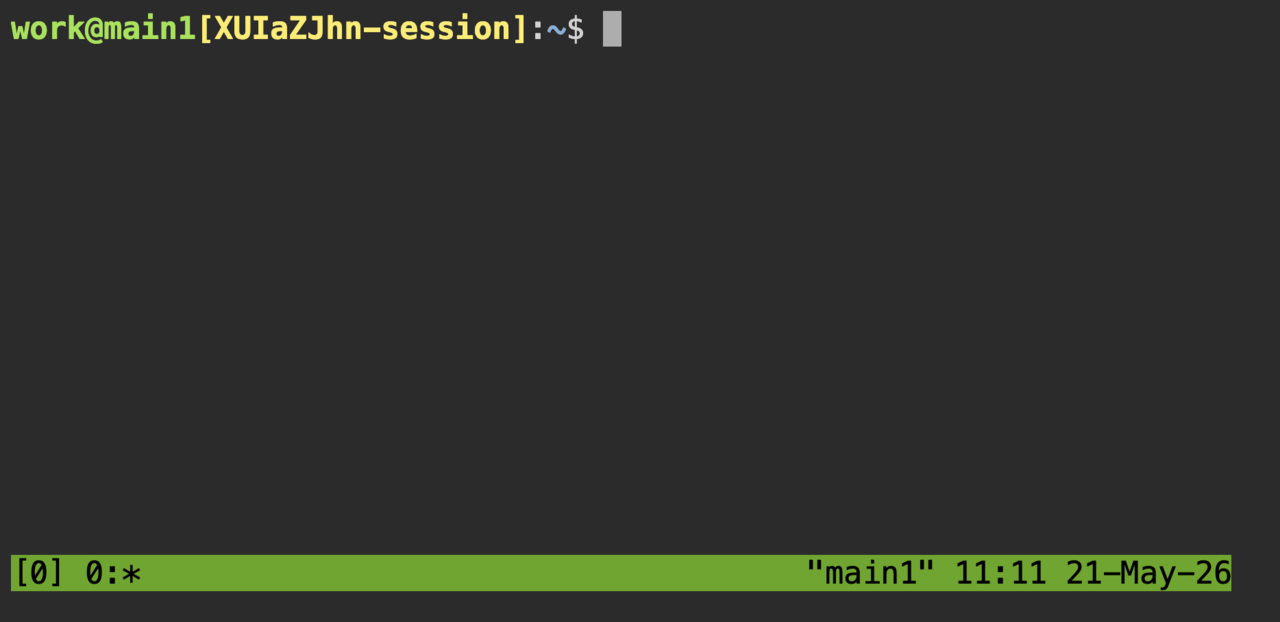
From the shell prompt, you can:
- Run Linux shell commands (
ls,cd,python, etc.) - Create and manage files
- Install software
- Use the module system
Closing the terminal browser tab does not stop the command that is running or the compute session.
1.1 Load and unload software
Typically, loading modules is as simple as entering module load <software_name>. The <software_name> must be visible when you run module av.
By entering:
module load <software_name>Lmod will set your environment such that the software specified in <software_name> will be placed in your PATH, and then you can run the commands associated with <software_name>.
If there are multiple versions of <software_name>, you can specify a version:
module load <software_name>/<version>For example, to load gcc version 12.3.0, enter:
module load gcc/12.3.0If no version is specified:
module load gccthen the default version will be loaded. The default version is indicated with a (D) next to it after running module av.
To unload a specific module, enter:
module unload <software_name>To unload all currently loaded modules and reset your environment, enter:
module purgeTo reload the default usc module collection, enter:
module load uscEnter module help to view more information about the available module commands.
1.2 Find software with module list
In the terminal, enter the module list command to view a list of loaded modules:
work@main1[XUIaZJhn-sessio]:~$ module list

Currently Loaded Modules:
  1) gcc/13.3.0      3) openblas/0.3.28   5) usc/13.3.0
  2) python/3.11.9   4) openmpi/5.0.5
This is our default software stack and the recommended one for most users, based on the GCC 13.3.0 compiler.
The naming convention for modules is <software_name>/<version> (e.g., gcc/13.3.0).
1.3 Use module av
To see what modules you can load into your environment, enter the command module av. With gcc/13.3.0 loaded, this will print a large number of available modules:
work@main1[XUIaZJhn-sessio]:~$: module av

---- /apps/spack/2406/apps/lmod/linux-rocky8-x86_64/openmpi/5.0.5-mufqd73/gcc/13.3.0 ----
   adiak/0.4.0                     hmmer/3.4                 parmetis/4.0.3         (D)
   armadillo/12.8.1                hpcg/3.1                  poppler/23.04.0
   arpack-ng/3.9.0                 hpl/2.3                   qmcpack/3.17.1
   arrow/7.0.0                     hypre/2.31.0              quantum-espresso/7.3.1
   boost/1.85.0                    ior/3.3.0                 scotch/7.0.3
   butterflypack/2.4.0             libcircle/0.3.0           sfcgal/1.5.1
   cgal/5.6                        lwgrp/1.0.5               silo/4.11.1
   charmpp/7.0.0                   mpigraph/main             slate/2023.11.05
   dtcmp/1.1.4                     namd/3.0b6                strumpack/7.2.0
   elpa/2023.11.001-patched        netcdf-c/4.9.2            superlu-dist/8.2.1
   fftw/3.3.10              (D)    netcdf-cxx4/4.3.1         thrift/0.18.1
   gdal/3.9.2                      netcdf-fortran/4.6.1      zoltan/3.901
   gmt/6.5.0                       netlib-scalapack/2.2.0
   hdf5/1.14.3              (D)    parallel-netcdf/1.12.3

----------------------------- /apps/lmod/modules/gcc/13.3.0 -----------------------------
   gromacs/2024.3

--------------- /apps/spack/2406/apps/lmod/linux-rocky8-x86_64/gcc/13.3.0 ---------------
   alsa-lib/1.2.12                           libtool/2.4.7
   ant/1.10.14                               libunistring/1.2
   aom/v3.9.1                                libunwind/1.6.2
   argobots/1.2                              libuv/1.46.0
   aria2/1.37.0                              libvorbis/1.3.7
...
To unload all your loaded modules, enter the command module purge. Then module list will return No modules loaded. If you enter module av again, then you will see only the core modules. These are primarily compilers but can also include applications like MATLAB that are pre-built and have no dependencies:
work@main1[XUIaZJhn-sessio]:~$  module av

-------------------------------------------------------- /apps/lmod/modules/utils ---------------------------------------------------------
   autoconf/2.72      gawk/5.3.0         micro/2.0.13         nvtop/3.0.2           rclone/1.74.3 (D)    tree/2.2.1
   automake/1.16.5    git/2.45.4         micro/2.0.14         perl/5.38.2           rsync/3.4.1          unzip/6.0
   binutils/2.42      git/2.51.0  (D)    micro/2.0.15  (D)    pkgconf/2.2.0         screen/4.9.1         vim/9.1.0437
   bison/3.8.2        gmake/4.4.1        nano/8.0             python/3.9.21         screen/5.0.1  (D)    vim/9.1.1391 (D)
   bzip2/1.0.8        gzip/1.13          ncdu/2.9.1           python/3.10.16        sed/4.9              wget/1.24.5
   cmake/3.29.4       gzip/1.14   (D)    neovim/0.10.0        python/3.11.9         strace/6.11          wget/1.25.0  (D)
   cpio/2.15          hdf5/1.14.3        nnn/5.0              python/3.12.8         tar/1.34             which/2.21
   curl/8.8.0         htop/3.4.1         nnn/5.1              python/3.13.2  (D)    tar/1.35      (D)    zip/3.0
   elfutils/0.190     lftp/4.9.3         nnn/5.2              rclone/1.72.1         tmux/3.5a
   emacs/29.4         m4/1.4.19          nnn/5.3       (D)    rclone/1.73.3         tmux/3.6a     (D)
--------------------------------------------------------- /apps/lmod/modules/misc ---------------------------------------------------------
   apptainer/1.3.6              gurobi/11.0.3                julia/1.12.0            paraview/5.13.3-osmesa        rstats/4.5.1
   apptainer/1.4.5              gurobi/12.0.2                julia/1.12.1            paraview/5.13.3        (D)    rstats/4.5.2       (D)
   apptainer/1.5.0              gurobi/12.0.3         (D)    julia/1.12.2            plink/1.07                    sas/9.4
   apptainer/1.5.1              hypershell/2.6.4             julia/1.12.3            plink2/alpha-6.5              schmutzi/1.5.7
   apptainer/1.5.2              hypershell/2.7.2      (D)    julia/1.12.4            povray/3.7.0.8                seqkit/0.16.1
   apptainer/1.5.3       (D)    intel-oneapi/2024.1.0        julia/1.12.5            povray/3.7.0.10        (D)    seqkit/2.12.0      (D)
   aws-cli/2.33.3               julia/1.10.2                 julia/1.12.6            qchem/6.2.0                   spaceranger/3.0.1
   bcftools/1.19                julia/1.10.5                 julia/1.12.7     (D)    qchem/6.3.0-mpi               spaceranger/3.1.2
   cellranger-arc/2.0.2         julia/1.10.6                 laguna/13.3.0           qchem/6.3.0-openmp            spaceranger/4.0.1
   cellranger-arc/2.2.0  (D)    julia/1.10.7                 legacy/CentOS7          qchem/6.3.1                   spaceranger/4.1.0  (D)
   cellranger-atac/2.1.0        julia/1.10.8                 mathematica/12.3        qchem/6.4.0                   spades/3.13.0
   cellranger-atac/2.2.0 (D)    julia/1.10.9                 matlab/2024a            qchem/7.0.0-mpi               stata/18
   cellranger/7.2.0             julia/1.10.10                matlab/2025b     (D)    qchem/7.0.0-openmp     (D)    texlive/2024
   cellranger/8.0.1             julia/1.10.11                ncurses/5.9             quarto/1.6.39                 texlive/2025
   cellranger/9.0.1             julia/1.10.12                nextflow/25.10.4        quarto/1.7.32          (D)    texlive/2026       (D)
   cellranger/10.0.0     (D)    julia/1.11.1                 nextflow/26.04.6 (D)    r/4.4.3                       usc/13.3.0
   comsol/5.6                   julia/1.11.2                 nvhpc/22.11             r/4.5.3                       ver/2506
   comsol/6.4            (D)    julia/1.11.3                 nvhpc/24.5       (D)    r/4.6.0                       ver/2607           (D)
   conda/25.11.0                julia/1.11.4                 openjdk/25.0.2          r/4.6.1                (D)    visit/3.4.2
   dlib/19.24.4                 julia/1.11.5                 ovito/3.11.2            rstats/4.3.3                  vmd/2.0.0a5
   gcc/8.5.0                    julia/1.11.6                 pandoc/3.2.1            rstats/4.4.1                  xeniumranger/3.0.1
   gcc/12.3.0                   julia/1.11.7                 pandoc/3.6.3            rstats/4.4.2                  xeniumranger/4.0.1 (D)
   gcc/13.3.0            (D)    julia/1.11.8                 pandoc/3.7.0.2          rstats/4.4.3
   gurobi/11.0.2                julia/1.11.9                 pandoc/3.9.0.2   (D)    rstats/4.5.0
  Where:
   D:  Default Module
To explore the software stacks available, load one of these core modules and then see which new ones are unlocked. For example, to see all applications built with a certain compiler, load that compiler module and then enter module av.
1.4 Use module spider
If you know the name of a software package you want to use, enter the module spider command to find out if it is available and how to load it.
Unlike module av, which shows only what is currently available to load, module spider can find software across all module hierarchies and show which prerequisite modules must be loaded first.
For example, to search for Open MPI modules:
work@main1[XUIaZJhn-sessio]:~$  module spider openmpi

-----------------------------------------------------------------------------------
  openmpi:
-----------------------------------------------------------------------------------
     Versions:
        openmpi/5.0.4
        openmpi/5.0.5

-----------------------------------------------------------------------------------
  For detailed information about a specific "openmpi" package (including how to load the modules) use the module's full name.
  Note that names that have a trailing (E) are extensions provided by other modules.
  For example:

     $ module spider openmpi/5.0.5
-----------------------------------------------------------------------------------
This shows that there are two versions of Open MPI available. For more specific information, add the desired version to the module spider command:
work@main1[XUIaZJhn-sessio]:~$  module spider openmpi/5.0.5

-----------------------------------------------------------------------------------
  openmpi: openmpi/5.0.5
-----------------------------------------------------------------------------------

    You will need to load all module(s) on any one of the lines below before the "openmpi/5.0.5" module is available to load.

      gcc/13.3.0

    Help:
      An open source Message Passing Interface implementation. The Open MPI
      Project is an open source Message Passing Interface implementation that
      is developed and maintained by a consortium of academic, research, and
      industry partners. Open MPI is therefore able to combine the expertise,
      technologies, and resources from all across the High Performance
      Computing community in order to build the best MPI library available.
      Open MPI offers advantages for system and software vendors, application
      developers and computer science researchers.
1.5 Environment management
One of the best features of Lmod is that it tracks software dependencies automatically. Importantly, there are two safety features when using the module system:
- Only one version of a module can be loaded at once
- Only one compiler and MPI implementation can be loaded at once
This ensures that the loaded modules are compatible with one another.
For example, let’s say you want to use the jellyfish package compiled with gcc/13.3.0. You would load it with:
work@main1[XUIaZJhn-sessio]:~$ module load gcc/13.3.0 jellyfishIf for some reason you need to switch to the intel compiler set, you can use the module swap command to swap out the gcc compiler:
work@main1[XUIaZJhn-sessio]:~$ module swap gcc intel

Due to MODULEPATH changes, the following have been reloaded:
  1) jellyfish/2.3.0
Lmod automatically changes the jellyfish module to one that was compiled with intel.
The module system can also automatically replace or deactivate modules to ensure the packages that are loaded are compatible with each other. For example, switching from gcc/13.3.0 to gcc/12.3.0:
work@main1[XUIaZJhn-sessio]:~$ module load gcc/12.3.0

Inactive Modules:
  1) openblas/0.3.28     2) openmpi/5.0.5

Due to MODULEPATH changes, the following have been reloaded:
  1) python/3.11.9

The following have been reloaded with a version change:
  1) gcc/13.3.0 => gcc/12.3.0
1.6 Additional resources
If you have questions about or need help with software modules, please submit a help ticket and we will assist you.